

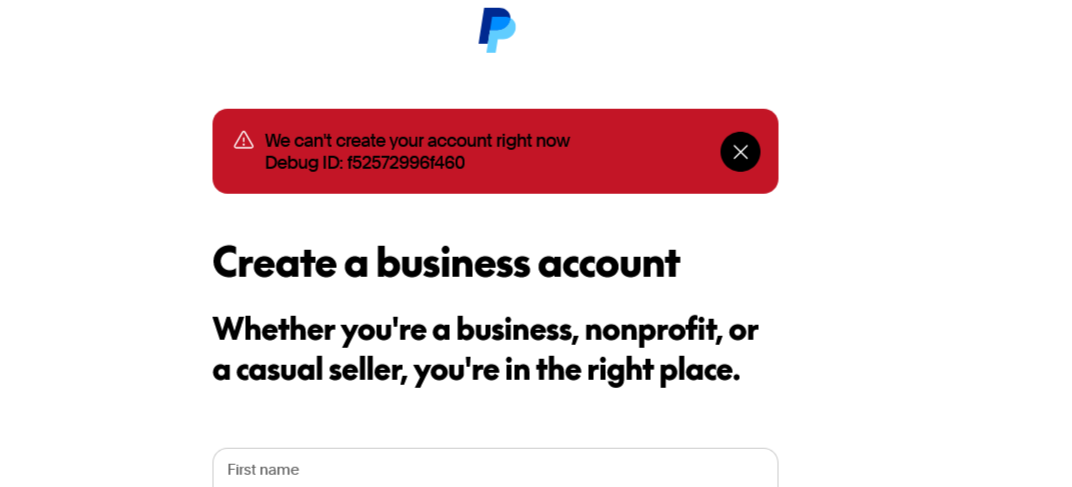
If you’re trying to sign up for PayPal and keep seeing the error message “We can’t create your account right now”, you’re not alone. This is one of the most common PayPal signup errors worldwide, especially when creating a new PayPal personal or business account.
The good news? In most cases, this error is temporary and can be fixed easily once you understand why it happens.
In this guide, we’ll explain why PayPal shows this error and walk you through proven solutions that work in 2026.
What Does “We Can’t Create Your Account Right Now” Mean on PayPal?
This PayPal error usually appears during the early stage of account registration. It means PayPal’s automated security system has paused or blocked the signup attempt due to technical, network, or risk-related triggers.
It does not always mean you’re permanently blocked.
Main Reasons for the PayPal Account Creation Error
1. Delay During the Registration Process (Session Timeout)
One of the most overlooked causes is taking too long during signup.
PayPal’s registration page has a limited session time. If you pause too long while entering:
-
Your full name
-
Email address
-
Password
…the system may time out and trigger the error.
✅ How to Fix This
-
Refresh the PayPal signup page
-
Start again from the beginning
-
Enter your details quickly and smoothly
-
Avoid switching tabs or leaving the page while registering
👉 Tip: Have your email and phone number ready before starting.
2. Flagged IP Address or Device
PayPal closely monitors:
-
IP addresses
-
Browsers
-
Devices
If an IP address or device has been associated with multiple PayPal account creation attempts, it may be temporarily flagged—even if you personally did nothing wrong.
This often happens when:
-
A shared Wi-Fi network is used
-
A device was previously used for PayPal signups
-
Public networks or cyber cafés are involved
✅ How to Fix This
-
Restart your router to get a new IP address
-
Try a different browser you’ve never used for PayPal (e.g., Firefox if you used Chrome)
-
If possible, use another device (a different phone or laptop)
⚠️ Avoid VPNs
PayPal and VPNs do not work well together. VPN usage often leads to:
-
Signup errors
-
Account limitations
-
Permanent locks
For best results, use a real, stable internet connection.
3. Creating a Business Account Directly
Many users experience this error when trying to create a PayPal Business account straight away.
PayPal applies stricter checks to business registrations, especially for:
-
New users
-
First-time accounts
-
Certain countries
✅ Smart Workaround
Instead of starting with a business account:
-
Create a PayPal Personal account first
-
Log in successfully
-
Upgrade it to a Business account from the dashboard
This method reduces signup errors and is fully supported by PayPal.
4. Problematic or Rejected Mobile Number
Sometimes the issue isn’t your name or email—it’s the phone number.
PayPal may reject numbers that:
-
Have been used on many accounts
-
Are linked to previous failed attempts
-
Are virtual or VoIP numbers
✅ How to Fix This
-
Refresh the signup page
-
Use a different mobile number
-
Prefer a real SIM card number registered in your name
-
Ensure the number can receive SMS verification codes
Additional Tips to Avoid the PayPal Signup Error
-
Use real and accurate personal details
-
Match your name exactly as it appears on your ID
-
Avoid copy-pasting information
-
Use a clean browser (clear cache and cookies if needed)
-
Sign up during normal hours (some users report fewer issues)
Frequently Asked Questions (FAQs)
❓ Is this PayPal error permanent?
No. In most cases, it’s temporary and related to security or technical checks.
❓ How long should I wait before trying again?
If nothing works, wait 24–48 hours before retrying from a different device or network.
❓ Does PayPal block VPN users?
PayPal doesn’t officially ban VPNs, but VPN usage frequently leads to account limitations or blocks, especially during signup.
❓ Can I contact PayPal support?
Yes, but for signup errors, PayPal usually advises retrying later or using a different method rather than manual approval.
