

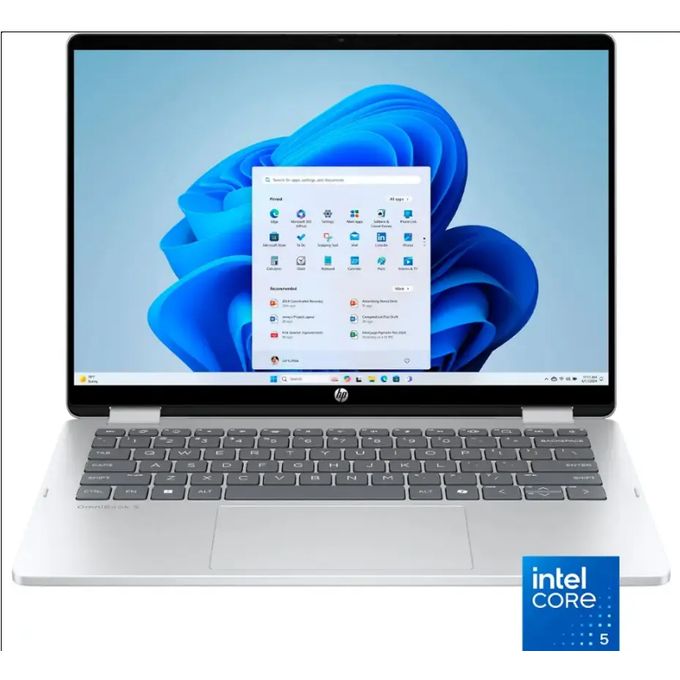
HP OmniBook 7: Powerful 17.3-Inch AI Laptop for Creators and Professionals
The HP OmniBook 7 is a large-screen laptop built for productivity, creative work, and modern AI-powered computing. With its 17.3-inch touchscreen display, Intel Core Ultra processor, Intel Arc graphics, and built-in AI features, the device promises to handle everything from everyday office work to light gaming and media creation.
But is the HP OmniBook 7 actually worth buying? In this detailed review, we’ll explore its performance, display quality, gaming capabilities, battery life, portability, and real-world usability. More importantly, we’ll also highlight practical details buyers usually discover only after purchasing, helping you make a smarter decision before investing in this laptop.
HP OmniBook 7 Specifications
Here are the key specs of the HP OmniBook 7:
-
Processor: Intel Core Ultra 7
-
AI Performance: Up to 47 TOPS (AI acceleration)
-
RAM: 16GB LPDDR5X
-
Storage: 1TB PCIe Gen 4 NVMe SSD
-
Graphics: Intel Arc Graphics
-
Display: 17.3-inch Full HD IPS Touchscreen
-
Operating System: Windows 11 Home
-
Battery: 47.8Wh
-
Weight: Around 5.5 lbs (2.5 kg)
-
Connectivity: Wi-Fi 6, Bluetooth, HDMI, USB-A, USB-C, SD card reader
These specifications place the OmniBook 7 in the category of high-performance productivity laptops rather than gaming machines.
Design and Build Quality
HP designed the OmniBook 7 to feel both premium and durable. The chassis uses a combination of recycled plastics and metals, reflecting HP’s focus on environmentally friendly manufacturing while still maintaining structural strength.
The hinge feels solid and stable, which is important for a laptop with such a large display. HP also subjects the device to military-grade durability testing, meaning it can withstand everyday bumps, pressure, and minor drops.
One important thing many buyers realize later is that the size of this laptop makes it more suited for desk setups than constant travel. At 5.5 pounds, it’s heavier than most ultrabooks. However, this trade-off allows HP to include a larger keyboard, number pad, and expansive display, which many productivity users actually prefer.
Display: Large 17.3-Inch Touchscreen
The standout feature of the OmniBook 7 is its 17.3-inch Full HD IPS touchscreen display.
The screen delivers:
-
Wide 178-degree viewing angles
-
Vibrant colors
-
Smooth touch response
-
Plenty of space for multitasking
A large display is incredibly useful when working with multiple documents, spreadsheets, editing tools, or creative applications.
However, one practical detail that many reviews skip is screen brightness in outdoor environments. While the display looks excellent indoors, it may struggle slightly in direct sunlight compared to premium high-brightness panels. For indoor work, though, it remains comfortable and immersive.
Performance and AI Capabilities
The laptop is powered by the Intel Core Ultra 7 processor, which includes dedicated AI acceleration capable of delivering up to 47 trillion operations per second (TOPS).
This hardware allows the system to run AI-powered applications more efficiently, including:
-
AI image generation
-
Smart video enhancements
-
Noise reduction during video calls
-
AI productivity tools
Combined with 16GB LPDDR5X RAM, the laptop handles multitasking smoothly. Users can easily run several applications simultaneously without experiencing slowdowns.
The 1TB PCIe Gen 4 SSD also ensures quick system boot times and fast file transfers.
Another important consideration is that the RAM is soldered and cannot be upgraded. While 16GB is sufficient for most users today, buyers planning to keep the laptop for many years should keep this limitation in mind.
AI Features with Windows 11
The OmniBook 7 integrates closely with Microsoft Copilot, which is built directly into Windows 11.
These AI tools allow users to:
-
Generate images using AI Co-Creator
-
Improve video call quality using Windows Studio Effects
-
Get AI assistance with writing and productivity tasks
-
Automate repetitive workflows
Interestingly, AI features on modern laptops continue improving through software updates. That means the AI capabilities of the OmniBook 7 may actually improve over time as Microsoft expands its AI ecosystem.
Graphics Performance and Gaming
The OmniBook 7 uses Intel Arc Graphics, which offers decent graphical performance for everyday tasks and light gaming.
Popular games like:
-
Fortnite
-
League of Legends
-
Valorant
can run smoothly at higher settings.
More demanding titles such as Cyberpunk 2077 may require medium settings for smooth gameplay.
This means the laptop is suitable for casual gamers, but users looking for high-end gaming performance should consider laptops with dedicated GPUs like NVIDIA RTX graphics.
Real-World Productivity Performance
In everyday use, the OmniBook 7 performs exceptionally well for common productivity tasks.
Users can comfortably perform activities such as:
-
Web browsing with many tabs open
-
Video conferencing
-
Document editing
-
Streaming media
-
Light photo and video editing
The large screen also improves productivity significantly because you can easily work with multiple windows side by side, something smaller laptops struggle with.
Keyboard, Trackpad, and User Experience
The laptop features a full-size keyboard with a number pad, making it ideal for users who frequently work with numbers, spreadsheets, or accounting software.
The keyboard offers:
-
Good key travel
-
Comfortable typing experience
-
Solid feedback
The trackpad is responsive and supports accurate gesture controls.
There is also a dedicated Copilot key, which instantly opens Microsoft’s AI assistant for productivity tasks.
Ports and Connectivity
The OmniBook 7 includes a strong selection of ports:
-
USB-A ports
-
USB-C ports
-
HDMI output
-
SD card reader
-
Headphone jack
The SD card reader is especially useful for photographers and video creators transferring files from cameras.
The laptop also supports Wi-Fi 6 and Bluetooth, providing fast and stable wireless connectivity.
Battery Life
Battery life on the OmniBook 7 is solid but not extraordinary.
With its 47.8Wh battery, users can expect:
-
Around 6 to 8 hours of light productivity work
-
Around 4 to 5 hours with heavier workloads
The large display consumes more power, which partly explains the moderate battery life.
The laptop charges fairly quickly, although the charger itself is slightly larger than typical ultrabook chargers.
Thermals and Cooling
In regular tasks such as browsing or typing, the OmniBook 7 stays cool and quiet.
During demanding tasks like gaming or video rendering:
-
Fans become more noticeable
-
The keyboard area may get slightly warm
However, HP’s cooling system prevents major thermal throttling, allowing the laptop to maintain consistent performance during extended workloads.
Storage and Upgradeability
One aspect many buyers care about is upgradeability.
While RAM cannot be upgraded, the laptop does allow storage upgrades through the M.2 SSD slot. This means users can add more storage in the future if their files and projects grow.
For creators working with large media files, this flexibility can be very useful.
HP OmniBook 7 Pros and Cons
Pros
✔ Large immersive 17.3-inch touchscreen
✔ Powerful Intel Core Ultra processor with AI features
✔ Smooth multitasking performance
✔ Full keyboard with number pad
✔ Good port selection including SD card reader
✔ Durable and eco-friendly build
Cons
✖ RAM cannot be upgraded
✖ Heavier than most laptops
✖ Not ideal for high-end gaming
✖ Screen brightness could be better outdoors
Who Should Buy the HP OmniBook 7?
The HP OmniBook 7 is best suited for:
-
Content creators
-
Students
-
Office professionals
-
Remote workers
-
Users who prefer large screens for multitasking
However, gamers and frequent travelers may prefer smaller laptops with dedicated GPUs.
Is the HP OmniBook 7 Worth It?
The HP OmniBook 7 delivers an impressive balance of performance, AI capabilities, large display, and productivity features. While it isn’t the most portable laptop and lacks upgradeable RAM, it excels as a powerful workstation for everyday productivity and creative tasks.
If you want a large-screen laptop with modern AI features and strong multitasking performance, the OmniBook 7 is definitely worth considering.
Frequently Asked Questions (FAQs) About HP OmniBook 7
Is the HP OmniBook 7 good for video editing?
Yes. The Intel Arc Graphics and Intel Core Ultra 7 processor provide enough power for light to moderate video editing, especially for YouTube creators and content editors.
Can you upgrade RAM in the HP OmniBook 7?
No. The 16GB LPDDR5X RAM is soldered, meaning it cannot be upgraded later.
Is the HP OmniBook 7 good for gaming?
It is suitable for casual gaming, but not ideal for high-end AAA games at ultra settings.
Does the HP OmniBook 7 have a touchscreen?
Yes. The laptop features a 17.3-inch Full HD touchscreen display.
How long does the battery last?
Battery life ranges between 6–8 hours for light tasks and around 4–5 hours for heavier workloads.
Is the HP OmniBook 7 good for students?
Yes. The large screen, comfortable keyboard, and strong multitasking performance make it a good choice for students who work with multiple applications at once.
