

If you’ve tried linking your M-Pesa account to PayPal only to be hit with the frustrating error “The M-Pesa account has already been registered for this service,” you’re not alone. Many users in Kenya have encountered this issue, and the good news is—there are several working solutions depending on your exact situation.
Here’s a complete guide on what this error means, why it happens, and step-by-step solutions that actually work.
❓ What Does This Error Mean?
This error usually appears when you try to link your Safaricom number (used for M-Pesa) to your PayPal account through the PayPal Mobile Money Service by Thunes. The message implies that the number has already been linked to a different PayPal account or there’s a mismatch in account information (such as email, name, or phone number).
✅ Solutions That Work
🔁 1. Unlink the M-Pesa Number via the Thunes Portal
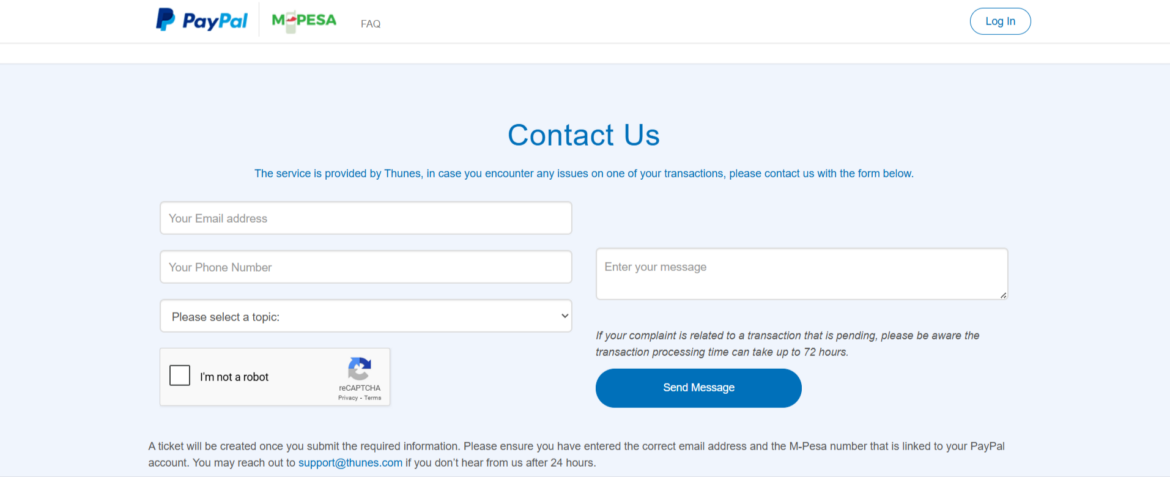
If you want to unlink your M-Pesa number from PayPal, you cannot do it yourself directly from your account. Instead, you need to contact Thunes, the service provider behind PayPal Mobile Money in Kenya. On there website there is only option to Link, so unlinking is done by them
👉 Use this official form:
https://www.paypal-mobilemoney.com/m-pesa/contact
🕒 Unlinking may take up to 3 days, so please be patient while they process your request.
✅ Note: This is the only official method at the moment. Make sure to include your details clearly in your message when filling the form.
📝 Tip: Use the same email and phone number when relinking. Even slight variations can cause errors.
📞 2. Call Safaricom Customer Care
Another route that works is asking Safaricom to unlink the number manually.
Steps:
- Call Safaricom Customer Care at 100 or 200.
- Request them to delink your number from PayPal services.
- This may take 3–4 business days, but it works.
✉️ 3. Email PayPal Support or Thunes Support
If the unlink page is down or not working, you can also:
- Email PayPal Kenya support directly.
- Or contact Thunes support at support@thunes.com
⚠️ Alternative Methods (If Unlinking Fails)
🔄 4. Register a New Safaricom Line
Some users had luck by:
- Getting a new Safaricom SIM card (registered in their name).
- Creating a new PayPal account.
- Linking the new SIM to the new PayPal account via the Thunes portal.
⛔ Warning: Avoid using numbers registered to other people. This can cause KYC and account verification issues.
💡 Bonus Alternatives for Withdrawals
If you’re looking for alternative ways to access your PayPal funds, consider the following options:
🏦 1. Link to an Equity Bank Account
Equity Bank offers direct PayPal integration:
- Link your PayPal from the Equity Mobile App.
- Transfer takes 1–3 days.
- You need at least KES 300 in your account during setup.
Many users recommend this as the most stable and reliable long-term solution.
🌍 2. Use Xoom by PayPal for Cross-Border Transfers to M-Pesa or Banks
If you’re looking for an alternative way to send or receive money through PayPal—especially in situations where the PayPal to M-Pesa link is not working or blocked—then Xoom by PayPal is one of the best backup solutions available.
What is Xoom?
Xoom is a secure money transfer service owned by PayPal that allows people to send money, pay bills, and reload phones across borders. It is especially useful for sending money from PayPal to M-Pesa or directly to Kenyan bank accounts.
✅ How It Works:
-
The sender needs to be in a supported country like the USA, UK, or Canada.
-
The receiver has to give sender details about your names and telephone be or local bank that are supported by xoom to receive funds. You the receiver don’t actually need to have a PayPal account in this case
-
The sender can log into Xoom.com or the Xoom mobile app using their PayPal credentials and initiate a transfer.
-
The funds can be delivered to:
-
M-Pesa mobile wallets
-
Kenyan bank accounts
-
Or even cash pickup points (where supported)
-
🌐 Useful for Restricted PayPal Countries Like Uganda, Tanzania,..
If you’re in a country like Uganda where PayPal’s full functionality is limited (such as not being able to receive money directly), Xoom offers a lifeline. A friend or family member in a supported country can send money to your MTN or Airtel mobile wallet, or you can collect the money in cash at partnered payout locations.
This makes Xoom an excellent option for:
-
Freelancers
-
Digital marketers
-
Small business owners
-
Students studying abroad
-
Or anyone doing international business from a PayPal-restricted country
🛑 Note:
-
You cannot send money to yourself using Xoom. Kenya can receive using xoom but you cant use a Kenyan PayPal on xoom to send money to your self on Mpesa or bank
-
Xoom charges a fee for transfers, and there might also be exchange rate markups, so always double-check the total cost before confirming.
🔄 When to Use Xoom:
-
When your PayPal-to-M-Pesa link is blocked
-
If you’re unable to receive PayPal funds in your country
-
For reliable and fast cross-border transactions
-
When you want direct delivery to M-Pesa, a bank, or cash pickup point
🔗 3. Use a Trusted Friend (With Caution)
Some users temporarily sent PayPal funds to a trusted friend’s account that was already linked to M-Pesa, then had the friend withdraw and send via M-Pesa.
🚨 However, this method can trigger PayPal security flags and holds, especially if identification or KYC mismatches are suspected.
❌ What Doesn’t Work (Myths & Clarifications)
- Global Pay Card: This is a debit card for online purchases. It cannot receive PayPal withdrawals.
- Random Linking Attempts: Continuously trying to relink without proper unlinking can trigger security flags.
- Using Unregistered Numbers: Must be a Safaricom line registered under your name.
