

If you have ever hired a web agency to build your website, or if you are a developer looking to cut costs on a project, you may have come across the idea of using nulled WordPress themes and plugins. They are free, they look identical to the paid versions, and they seem like an easy way to save money. But as a web professional who has used nulled themes personally and witnessed the damage they cause firsthand across multiple real client projects, I can tell you that nulled plugins and themes are one of the most destructive decisions a business or developer can make.
This article breaks down exactly what nulled WordPress software is, what really happens when it ends up on your website, who the real victims are, and what responsible developers and business owners should do instead.
What Are Nulled WordPress Themes and Plugins?
A nulled WordPress theme or plugin is a premium, paid piece of software that has been modified to remove its license verification system and then redistributed for free — usually through unofficial websites, GitHub repositories, or private sharing groups.
The argument some developers make is that because WordPress is built on open-source software and licensed under the GPL — the GNU General Public License — sharing and redistributing WordPress-based code is technically permitted. This is partially true and worth understanding properly, because the conversation around nulled plugins is more nuanced than a simple piracy versus legitimate use debate.
WordPress core is GPL-licensed, and many themes and plugins built on top of it inherit that license. This means some developers and legal commentators argue that “nulled” GPL software is not piracy in the traditional sense. Some well-established GPL shops even charge a membership fee to provide access to premium plugins without individual licenses, operating in a grey area that many professionals navigate.
However — and this is the critical point — the GPL argument completely falls apart the moment malware enters the picture. And with nulled software distributed through unvetted sources, malware is a very real and very common risk.
It is also important to state clearly upfront: not every website that gets hit with malware is using nulled or pirated themes and plugins. Outdated legitimate plugins, compromised admin credentials, vulnerable hosting environments, and phishing attacks on staff members are all routes through which malware reaches WordPress sites built entirely on legitimate software. Nulled themes and plugins are a major risk factor — but they are not the only one, and painting every infected site as the result of piracy is inaccurate.
My Personal Experience With Nulled WordPress Themes and Plugins
Before discussing what can go wrong, I want to be transparent. Early in my web development journey, I used nulled themes on projects. I am sharing this not to normalise the practice but because honest firsthand experience is the most credible foundation for this kind of warning. What I observed across those projects changed how I work permanently.
Here is what I personally encountered and witnessed.
Malicious Scripts Consuming Server Bandwidth and Causing Sites to Shut Down
One of the first serious problems I encountered with nulled themes was hidden scripts running silently in the background and consuming server resources at an alarming rate. These were not obvious processes — there was no visible sign in the WordPress dashboard that anything unusual was happening. But behind the scenes, malicious code embedded in the theme files was making outbound connections, running automated processes, and burning through the hosting account’s allocated bandwidth.
The result was that the hosting provider suspended the account due to excessive server resource usage. The website went offline with no warning to the client. Diagnosing the cause took significant time, and by then the damage — in downtime, lost traffic, and broken client trust — was already done. The money saved on a theme licence was dwarfed entirely by the cost of cleanup, the lost business during downtime, and the time invested in fixing a problem that should never have existed.
I have seen this happen more than once. Servers suspended without warning. Hosting accounts terminated. Clients calling in a panic because their website and business emails are both offline simultaneously — because both sit on the same hosting account that the malicious code brought down.
Sites Suddenly Publishing Content About Drugs, Gambling, and Pornography
This is one of the most alarming and embarrassing things that can happen to a business website, and it is directly connected to nulled themes more often than people realise. Hackers who embed backdoors inside nulled theme files do not always act immediately. Sometimes they wait weeks or even months after installation before activating their access — by which point the developer has long since moved on and nobody is monitoring the site closely.
When they do act, one of the most common tactics is using the compromised site to publish spam content. Pages and posts appear on the website promoting illegal pharmaceuticals, offshore gambling platforms, adult content, and other products that the attacker is being paid to market through black-hat SEO methods. The business owner’s website becomes an unwilling advertising platform for criminal enterprises — entirely without their knowledge.
I have witnessed this directly. A legitimate professional services website suddenly had dozens of pages indexed in Google promoting gambling platforms and pharmaceutical products. The business owner had no idea. Clients and potential customers who searched the company name online found that content sitting on their own domain. The reputational damage was immediate and severe, and the Google deindexing that followed took months to address.
Manipulation of the .htaccess File to Remove Sites From Google
One of the more technically sophisticated attacks I have personally observed connected to nulled themes involves the manipulation of the website’s .htaccess file. This is a critical server configuration file that controls how the web server handles requests — including redirects, access permissions, and how the site is served to different visitors.
Hackers with backdoor access gained through nulled themes have been known to modify the .htaccess file in ways that are specifically designed to hide what they are doing while causing maximum damage to the legitimate site owner. One tactic involves configuring the .htaccess file so that search engine crawlers — Googlebot in particular — are blocked from accessing the site, effectively removing it from Google’s index over time while the site continues to appear normal to human visitors.
This means the site owner continues to believe everything is fine because the website loads normally in their browser. Meanwhile, their Google rankings are quietly disappearing. Their organic traffic drops week by week. By the time they notice the decline and investigate the cause, significant ranking ground has been lost — and tracing it back to a modified .htaccess file requires technical knowledge that most business owners do not have.
Hackers Adding Themselves as Users in Google Search Console
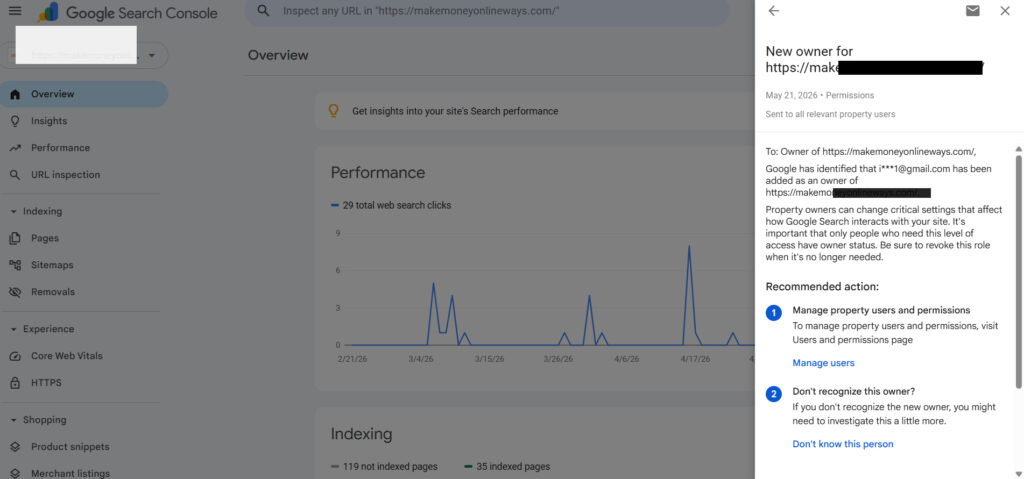
This is something I have seen with my own eyes and it remains one of the most calculated and underreported consequences of nulled theme infections. Once an attacker has backdoor access to a compromised WordPress site, they do not limit themselves to the WordPress dashboard. In some cases they go further and add themselves as verified users inside the site’s Google Search Console account — also known as Google Webmaster Tools.
Below is screenshot of unknown user adding himself in one of my personal websites i used a nulled theme
Below are list of hacker emails who have added themselves into my webmaster console through nulled themes and plugins
indo45101@gmail.com, superamber63@gmail.com, aripinihwan0@gmail.com, fadilheri365@gmail.com, judahroman88@gmail.com
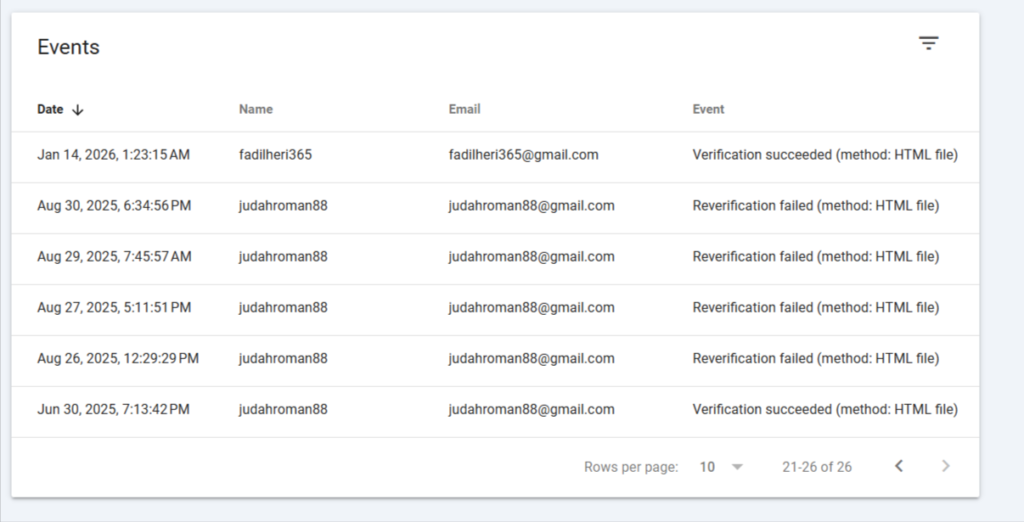
Why would they do this? Because the spam pages and gambling or drug content they have planted on the site are essentially SEO campaigns. By gaining access to Google Search Console, they can monitor exactly how those planted pages are performing in Google search results. They can see which keywords are ranking, how much traffic those pages are receiving, and whether Google has detected and penalised the spam content yet.
It is a calculated, patient operation. The attacker is running a black-hat SEO business on the back of a legitimate website that someone else paid to build and maintains — and they are using professional tools to track their results while the real site owner remains completely unaware that someone else has access to their Google Search Console property.
If you discover unrecognised users in your Google Search Console, treat it as a serious security incident immediately.
Malicious Folders Created on the Server to House Dangerous Content
Nulled theme infections frequently go beyond modifying existing files. In several cases I have investigated personally, the malicious code embedded in nulled themes was designed to create entirely new folders and directories on the web server — hidden within the site’s file structure in locations that are rarely checked during routine maintenance.
These folders are used to house dangerous content that has nothing to do with the legitimate website. Phishing page replicas of banks and financial institutions. Spam landing pages. Files used as part of coordinated malware distribution networks. Content that uses the legitimate site’s domain reputation and hosting infrastructure as a vehicle for attacks on third parties.
The site owner is entirely unaware these folders exist. Their hosting account is being used as a distribution point for attacks on other people. And if the hosting provider or authorities trace the activity back to the server, it is the legitimate account holder who faces the initial questions and consequences.
Checking your server’s file structure regularly — particularly the uploads folder, the root directory, and any recently modified directories — is an essential security practice that most WordPress site owners never perform.
Unauthorised Admin Accounts Appearing in WordPress Users
Another pattern I have observed repeatedly is one of the most insidious because it is invisible until someone looks directly for it. Nulled themes frequently contain backdoor scripts that create new WordPress administrator accounts silently — accounts controlled by the attacker that give them full, persistent access to the WordPress installation.
The first visible sign is typically only discovered when someone checks the WordPress Users section and finds administrator accounts they did not create, often with generic or randomly generated usernames and email addresses pointing to disposable accounts.
These phantom admins give the attacker complete control. They can change site settings, publish content, install additional malicious plugins, modify theme files, redirect the entire site, or access and export the site’s database. Removing the rogue accounts does not solve the problem — the backdoor that created them is still embedded in the site’s files and will simply create new accounts the next time it runs.
A full professional security audit and cleanup is required, and even then a complete rebuild from a verified clean backup is often the most reliable resolution.
Private User Data Being Stolen — Dating Sites, eCommerce, and Membership Platforms
This is the most serious consequence of nulled theme use that I want to highlight, because the harm extends far beyond the business owner to innocent users who trusted the site with their personal information.
Nulled themes installed on websites that collect user data — dating platforms, membership sites, eCommerce stores, booking systems, community forums — are a deliberate target for database theft. Malicious code in these themes is specifically engineered in some cases to connect to the site’s database and extract user records including email addresses, usernames, passwords, phone numbers, and in worst cases payment information.
I have personally seen this happen on dating and social platform sites where the entire registered user email database was harvested silently over an extended period. Those users — real people who trusted the platform with their information — had their data sold or weaponised for spam and phishing campaigns without ever knowing their details had been stolen. The platform owner faced serious legal and reputational consequences. The users faced ongoing harassment and privacy violations. All of it traceable back to a nulled theme installed to avoid paying a licence fee.
How to Scan for Malicious Code in Nulled Themes and Plugins
If you are a developer who suspects a theme or plugin may contain malicious code — or if you are auditing a site that has been compromised — there are specific things to look for in the codebase.
The two most important keywords to scan for are eval and strrev.
The eval function in PHP executes a string of code as if it were actual PHP. Legitimate themes and plugins have almost no reason to use eval. When you find eval in a theme or plugin’s PHP files, particularly when it is wrapping encoded or obfuscated strings, treat it as a serious red flag requiring immediate investigation.
The strrev function reverses a string. It is used in malicious code as a simple obfuscation technique — hiding a recognisable malicious string by storing it in reverse so that automated scanners are less likely to flag it. Finding strrev in theme or plugin code, especially in combination with eval or base64_decode, is a strong indicator of malicious intent.
Other obfuscation patterns to watch for include base64-encoded strings being decoded and executed, gzinflate and str_rot13 functions used to obscure code, and unusually long strings of what appears to be random characters.
Security plugins like Wordfence and Sucuri have automated scanners that check for many of these patterns. But understanding what to look for manually is an important skill for any professional WordPress developer, because automated scanners do not catch everything.
The Google Deindexing Consequence Nobody Talks About Enough
When a website begins serving malware, hosting spam content, redirecting visitors to harmful destinations, or serving different content to search engine crawlers than to human visitors — Google’s systems eventually detect it. The consequences are severe.
Google will first display a warning to users attempting to visit the site — a full-screen alert stating the site contains malware or deceptive content. This destroys traffic instantly. Most users will not proceed past that warning.
If the issue persists or is severe enough, Google removes the site from its search index entirely. Years of SEO work, content creation, and organic ranking — gone. Recovering requires cleaning every infected file, submitting a reconsideration request through Google Search Console, and waiting through a review process that can take weeks or months with no guaranteed outcome.
For a business whose primary source of customers comes through Google search, deindexing is potentially fatal. All of this from a theme that cost nothing to download.
The Question Every Developer Must Ask Themselves
At this point I want to speak directly to fellow web developers, because this is a professional ethics question as much as a technical one.
Is it worth fighting all of these attacks — malware infections, .htaccess manipulation, backdoors, phantom admin accounts, hidden server folders, spam content injections, data breaches, Google Search Console hijacking, server suspensions, and Google penalties — just to avoid paying for a legitimate software licence?
Think about it practically. If a client pays you five hundred dollars to build their website, why would you not spend sixty-five dollars on a legitimate premium theme? Why would you not spend another thirty to fifty dollars on the plugins the project genuinely requires? That is a small and entirely justifiable fraction of the project budget. It is a cost you can build into your pricing transparently and professionally. And it means the client receives what they paid for — a website built on legitimate, supported, secure software.
When you use a nulled theme to protect your own margin, you are not saving money. You are transferring risk. You are taking the financial risk of every potential security incident described in this article and placing it entirely on your client — a client who trusted you, paid you, and has no idea what decisions you made behind the scenes.
Every hour you spend cleaning up a malware infection, recovering a suspended server, appealing a Google deindexing, removing phantom admin accounts, hunting hidden folders on a compromised server, or explaining to a client why their website is ranking for drug terms could have been avoided by spending the price of a casual dinner on a legitimate theme licence.
The mathematics do not favour nulled software. Not professionally, not financially, and certainly not ethically.
A Direct Message to Clients: What You Pay For Is What You Get
This conversation must go both ways, and business owners need to hear this clearly.
If you pay a developer one hundred dollars to build you a professional website, you need to ask yourself honestly what you expect that developer to deliver for that amount. A professional website built on legitimate licensed software, with proper security configuration, thorough testing, and ongoing support cannot be built for one hundred dollars. The numbers simply do not work.
At that price point, something is being cut. Usually several things. Legitimate theme licences are bypassed. Premium plugin licences are skipped. Testing time is minimised. Security hardening does not happen. And the developer — who also has bills to pay — cannot invest proper time into a project at that rate.
When you hire someone at below-market rates and then discover your website has been compromised, your customers’ data has been stolen, your server has been suspended, or your site is publishing content about gambling and drugs — the decision that ultimately led to that outcome was made when you chose the cheapest possible option.
This is not about blaming clients. Most business owners genuinely do not know what professional web development involves or what it reasonably costs. But the expectation that a complex, secure, professional website can be delivered for the price of a phone credit top-up is one that the industry needs to address honestly.
A professional website is an investment in your business infrastructure. It is your digital storefront, your primary marketing channel, and in many cases the first interaction a potential customer has with your brand. Treating it as a line item to minimise rather than an asset to invest in properly is a decision with very real consequences.
Work with developers who are transparent about their costs, who can explain exactly what software they use and why, and who charge rates that make it possible to do the job properly. The cheapest developer is almost never the best value.
What Responsible Developers and Agencies Should Do
The professional standard is clear, even if not everyone follows it.
Pay for legitimate licences on every tool you use in client work. Premium WordPress plugins and themes represent a tiny fraction of any professional project budget. Build those costs into your pricing openly and honestly.
Keep everything updated without exception. Outdated plugins and themes are a security liability regardless of how they were obtained. Maintenance agreements that include regular updates, security monitoring, database backups, and file integrity checks are not optional extras — they are a core deliverable of professional web development.
Audit WordPress user accounts regularly. If you manage a site and find administrator accounts you did not create, treat it as a security incident immediately. Change all passwords, revoke the unknown accounts, run a full malware scan, and check your Google Search Console for unrecognised users.
Check your server file structure periodically. Look for recently created folders in unexpected locations, particularly within the uploads directory and the site root. Anything you did not put there needs to be investigated before it is deleted, to understand how it got there.
Monitor your .htaccess file. Keep a known-clean copy and compare it periodically against what is actually on the server. Unexpected additions to .htaccess — particularly rewrite rules you did not write — are a serious warning sign.
Use security tools like Wordfence or Sucuri for automated monitoring and scan regularly for known malware signatures including eval, strrev, base64_decode patterns, and other obfuscation techniques.
Price your work honestly. If a project requires legitimate software licences, include those costs in your quote and explain them to your client. A client who understands what they are paying for is a client who values the work appropriately.
What Business Owners Should Ask Before Hiring a Web Developer or Agency
Ask directly whether they use licensed themes and plugins on client projects. A professional who works with legitimate tools will answer this question confidently without hesitation.
Ask what their security and maintenance process looks like after the site goes live. An agency that hands over a website and disappears is leaving you completely exposed to the risks described throughout this article.
Ask who owns and controls your domain name and hosting account. Your domain should be registered in your own name, under your own account, at all times. Losing control of your domain to a disgruntled developer is a documented and devastating problem.
Ask for client references and actually contact them. Ask those clients whether they have encountered any website security problems and how the agency responded.
Check your own Google Search Console regularly for users you did not add. If you see an email address in your Search Console property that you do not recognise, remove it immediately and conduct a full security review of your website.
And be willing to pay a fair price. The agency that quotes you a price that makes proper professional work possible is not overcharging you. They are protecting your investment.
Final Verdict — Cheap Development Is the Most Expensive Decision You Can Make
The pattern in every case where nulled plugins and themes cause serious damage is the same. A developer protected their profit margin by skipping software licences. A client paid for a professional service and received something built on a compromised foundation. The business owner — who had no idea what decisions were made behind the scenes — dealt with every consequence alone.
Server suspensions. Database breaches. User data stolen. Spam content flooding the domain. .htaccess files manipulated to kill Google rankings. Phantom admins created in the WordPress dashboard and Search Console. Malicious folders created on the server. Google deindexing. Customer trust destroyed permanently.
All of it traceable back to a decision made in minutes to save sixty-five dollars on a theme licence.
Professional web development done properly is not expensive relative to the value it protects and delivers. Legitimate licences, current software, proper security configuration, and ongoing maintenance are not luxury additions. They are the minimum standard of responsible professional practice.
If you are a developer — build your reputation on work you can stand behind completely. Charge what the work is genuinely worth. Protect your clients the way you would want your own business protected. No short-term saving on a software licence is worth the long-term cost to your professional reputation when a client’s site is compromised.
If you are a business owner — invest in your digital presence properly. Ask the right questions before you sign anything. Pay rates that make proper work possible. And understand that the developer who is sixty percent cheaper than everyone else is saving that money somewhere — and you will eventually find out exactly where.
This article is based on my 20 years experience across multiple web development projects, firsthand observation of security incidents on client websites, and extensive work within the WordPress developer community. It is written to help both developers and business owners make fully informed decisions about Cyber security, WordPress security, professional standards, and the real cost of cutting corners on software licenses.
