

Choosing a smart TV today is not just about screen size or picture quality. The operating system (OS) that powers the TV also plays a major role in your overall experience. Two of the most widely used platforms are Google TV and LG webOS.
Both platforms allow you to install streaming apps, watch videos, and control smart home devices from your TV. However, they differ significantly in app availability, flexibility, updates, and ecosystem integration.
If you mainly use your TV for streaming services, YouTube, Twitch, or casting from your phone, understanding the differences between these platforms can help you choose the best experience in 2026.
What Is Google TV?
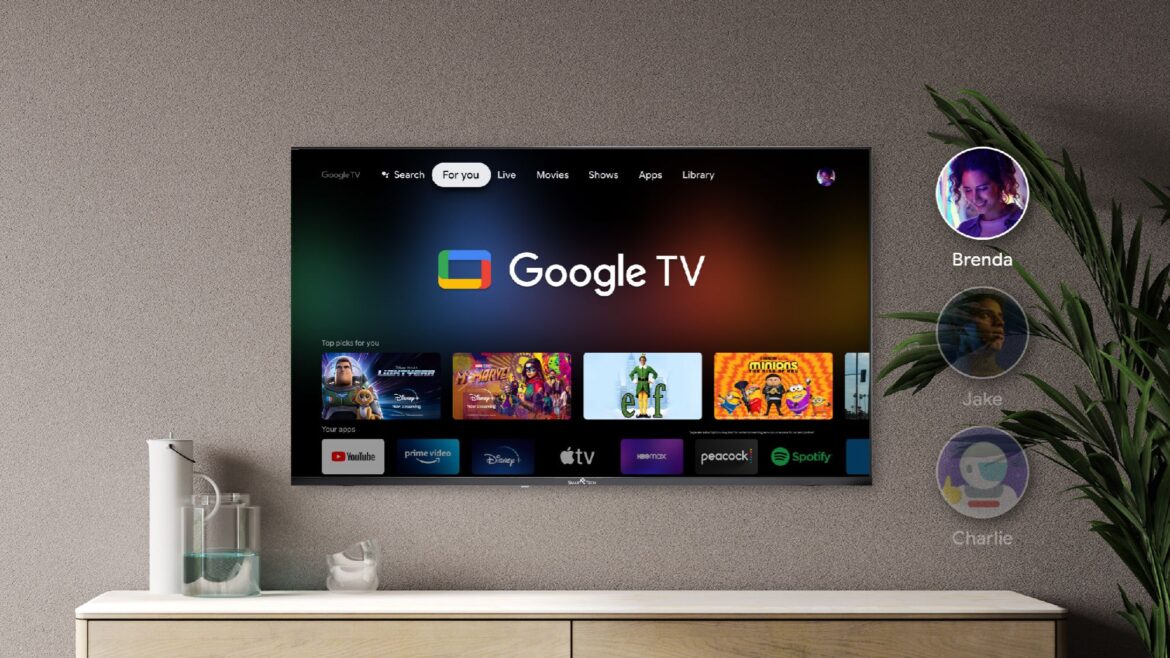
Google TV is Google’s modern smart TV interface built on top of Android TV. It is commonly found on TVs from brands like Sony, TCL, and Hisense, and also powers devices like the Chromecast with Google TV.
The platform focuses heavily on content discovery and app integration. Through the Google Play Store, users can install thousands of apps including streaming platforms, games, and utilities.
Google TV is a smart interface built on top of Android TV. Think of it as a “super-aggregator.” Instead of making you jump from app to app, it pulls movies and shows from all your subscriptions into a single, unified “For You” screen.
-
How it works: It uses Google’s massive Knowledge Graph to understand your habits. If you search for “sci-fi movies,” it doesn’t just show you YouTube results; it shows you options from Netflix, Disney+, and HBO Max simultaneously
Popular apps available include:
-
YouTube
-
Twitch
-
Netflix
-
Amazon Prime Video
-
Crunchyroll
One major advantage is Chromecast integration, which allows users to easily cast videos from their phones or computers.
What Is LG webOS?
LG webOS (The Multitasking Specialist) is LG’s proprietary smart TV platform used in models such as the LG C3 OLED TV, LG C4 OLED TV, and other LG smart TVs. WebOS is built specifically for speed and ease of use. It is famous for its Magic Remote, which works like a Nintendo Wii controller—allowing you to point and click on the screen rather than clicking arrows on a D-pad.
-
How it works: It uses a sleek, card-based interface. A ribbon of apps sits at the bottom or side of your screen, letting you switch between your gaming console, Netflix, and the web browser without losing your place in a live broadcast
webOS is designed specifically for LG hardware and offers:
-
A simple card-based home screen
-
Fast access to installed apps
-
Integration with the LG Magic Remote pointer system
For many users, webOS feels smooth and responsive, especially on high-end OLED models.
However, because it is a closed ecosystem, the app selection is smaller compared to Android-based platforms.
Streaming Quality: Is One Better Than the Other?
One common question is whether external streaming devices provide better video quality than built-in smart TV apps.
In most cases, streaming quality is very similar between Google TV devices and built-in webOS apps when watching content from services like Netflix or YouTube.
However, there is a small technical detail to consider.
Because built-in apps run directly on the TV hardware, the video signal does not need to pass through an HDMI connection. Some users report that this can result in slightly cleaner video with less digital noise compared to external streaming boxes.
In everyday viewing, though, the difference is usually minimal.
Verdict: Both are comparable for most users.
App Availability and Flexibility
When it comes to app support, Google TV clearly has the advantage.
Since it uses the Android ecosystem, users can install:
-
Thousands of apps from the Play Store
-
Alternative launchers
-
Emulator software
-
Specialized streaming tools
In contrast, LG webOS has a smaller app catalog.
While major streaming apps are available, some niche apps either appear later or never launch on webOS at all.
This is one reason why many tech enthusiasts prefer Android-based systems.
Winner: Google TV
Updates and Long-Term App Support
Another difference is how each platform handles updates.
TVs running LG webOS often stay on the version they shipped with, receiving only minor updates. Over time, this can lead to compatibility issues as app developers prioritize newer versions.
On the other hand, devices using Google TV typically receive more consistent updates, thanks to Google’s Android ecosystem.
This makes Google TV devices more likely to stay compatible with newer apps in the long run.
Winner: Google TV
Privacy and Data Tracking
Some users also consider privacy when choosing a platform.
Google TV is deeply integrated with your Google account, meaning the system can track viewing habits to recommend content across multiple services.
This helps deliver personalized recommendations, but it also means Google collects more user data.
In contrast, webOS tends to be less integrated with external ecosystems, which some users prefer from a privacy standpoint.
Winner: webOS (for privacy-focused users)
Performance and Speed
Performance often depends on the hardware inside the TV or streaming device.
High-end LG TVs like the LG C3 OLED TV often run webOS smoothly, and many users report that navigation feels fast and responsive.
However, lower-end TVs or older models may slow down over time.
Google TV devices can also vary widely in performance depending on the chipset used. Premium streaming boxes tend to outperform budget devices.
Verdict: Depends on hardware.
When You Should Use Google TV Instead
Google TV is usually the better option if you want:
-
A larger selection of apps
-
Better casting from smartphones
-
More customization options
-
Smart home integration and unified watchlists
For many users, adding a device like the Chromecast with Google TV can dramatically expand what their TV can do.
When webOS Is Actually Better
Despite the advantages of Google TV, webOS still makes sense for many users.
If your TV already supports all the apps you need, the built-in system might be the better choice because:
-
It avoids extra hardware
-
Built-in apps sometimes provide slightly cleaner video processing
-
Navigation can feel simpler and faster
For people who only use a few major streaming apps, webOS works perfectly well.
Google TV vs webOS
Both platforms offer a solid smart TV experience, but they cater to different types of users.
Choose Google TV if you want:
-
Maximum flexibility
-
A huge app ecosystem
-
Better casting from your phone
-
More frequent updates
Choose webOS if you prefer:
-
A simple and fast interface
-
Built-in streaming apps that work well
-
Slightly cleaner playback from native apps
For many viewers, the ideal setup is an LG OLED TV with a Google TV streaming device, combining excellent display quality with a powerful app ecosystem.
